Turtle
January 31, 2025Do you know, how some projects are just stupid? Well, this is one of them.
Introducing: Turtle. The permission-less job runner that
integrates with GitLab.
You might be asking yourself what exactly permissionless even means. And to
understand that, we have to start at the beginning.
I began work on Turtle as part of a university project. At the beginning of
the semester, we were given the task to develop small projects (in our case, a
game) as part of the semester work. As we wanted to automate tests and releases,
we requested a GitLab runner from our instructor. Initially we were told that
it would be done by the end of November. However, that date came and went
without any sign of the GitLab runner.
So over Christmas, I decided to take things into my own hands.
Unfortunately, we only have Developer access to the repo, meaning that we
can’t access the repo settings to add runners.
And this is exactly what permission-less refers to: The runner does not
need privileged access to the repo. Instead, it hooks into your personal account
using a personal access token. (If you prefer, you could also create a separate
GitLab account for the runner. Unfortunately, we can’t do that on the univeristy
GitLab instance.)
The way this works is that turtle regularly checks the merge requests for a
job trigger. You can set the trigger word in the config file, but the example
config file sets it to turtle.
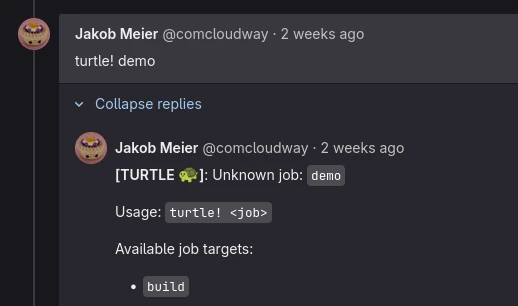
The job to run is specified after the trigger. If no valid job is provided,
turtle will reply with a help message.
The first prototype loaded a sourcehut builds manifest
definition from the config file and used the sourcehut API to schedule the job
on my personal sourcehut instance. However, because my server is fairly
low-spec, it couldn’t really handle the load of the VM running and crashed
multiple times (in the development process).
I decided that running the jobs inside a docker container would perform better,
but as sourcehut lacks a docker backend, I decided to drop sourcehut support
and instead look at alternatives.
My first idea was to register a forgejo runner with turtle,
but there were so many server endpoints that the runner expects, like ping and
multiple registration endpoints, that I decided that it wouldn’t be worth it.
I also looked at forgejo-runner exec, which allows you to run workflows
locally. But for some reason I can’t get it to work properly most of
the time: For example, it lists the available jobs using -l, but when I try
to select one using -j it says that the job is invalid.
As this project was only intended to be a proof of concept, I decided to just
build my own simple Docker job runner.
Turtle is written in Go, and uses two goroutines, which
are basically threads in Go and thus allow parallel execution.
The threads communicate with one another by sending messages through
channels.
When creating a channel, you can specify how many messages the channel can
buffer before blocking the send call. I use this to construct a job queue,
which can schedule multiple jobs without blocking the GitLab crawler.
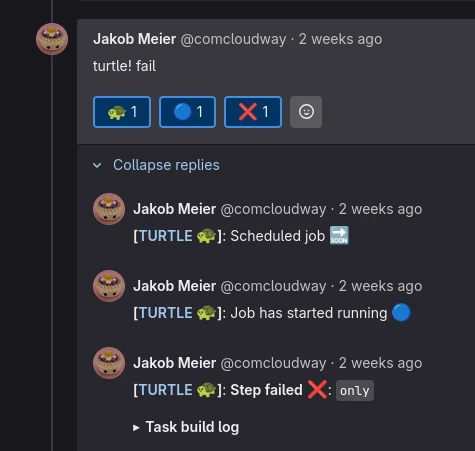
Once detected, the crawler sends a Scheduled job message in a GitLab thread
and schedules a job by sending a message to the queue. The runner thread can
only execute one step at a time, so once it receives the message, it sends
a job running message to indicate that the job status changed.
A job workflow can consist of multiple steps that are executed in order, unless
one of the jobs fails, in which case the entire pipeline fails.
Whenever a job is done, it sends its log output to the same GitLab thread.
And when the pipeline finishes, by either failing or succeeding, a follo-wup
status report is published.
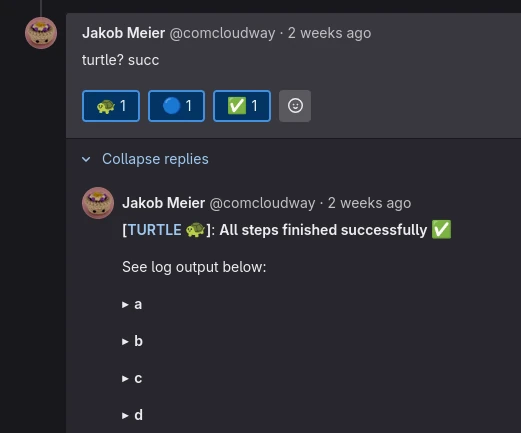
After receiving complaints that this caused too many spam emails, I decided to
implement a quiet mode (indicated by the ? behind the trigger) where only the
final result is reported as a text message. The other state changes are instead
reported as emoji reactions, because they don’t trigger email notifications.
And that is basically where the project is at.
I doubt that I’ll ever work on it again, but I really enjoyed experimenting
with the GitLab API and thinking about what a job runner that doesn’t require
admin access might look like.
Similar to most of my projects, you can find the sourcecode on codeberg with a simple setup instruction in the README.
One last thing: please don’t use this to spam random projects. Actually, don’t use this project at all - Use a proper CI runner, like:
- GitLab CI
- Woodpecker
- Forgejo Actions (requires a Forgejo instance)